This bulk upload type provides administrators access to create Learning Plans in bulk.
Bulk Uploads
For more information on the Bulk Uploads feature and best practices for using the workflow, refer to our article on Bulk Uploads.
Continue reading this article to learn more about creating learning plans in bulk.
Template Specifications
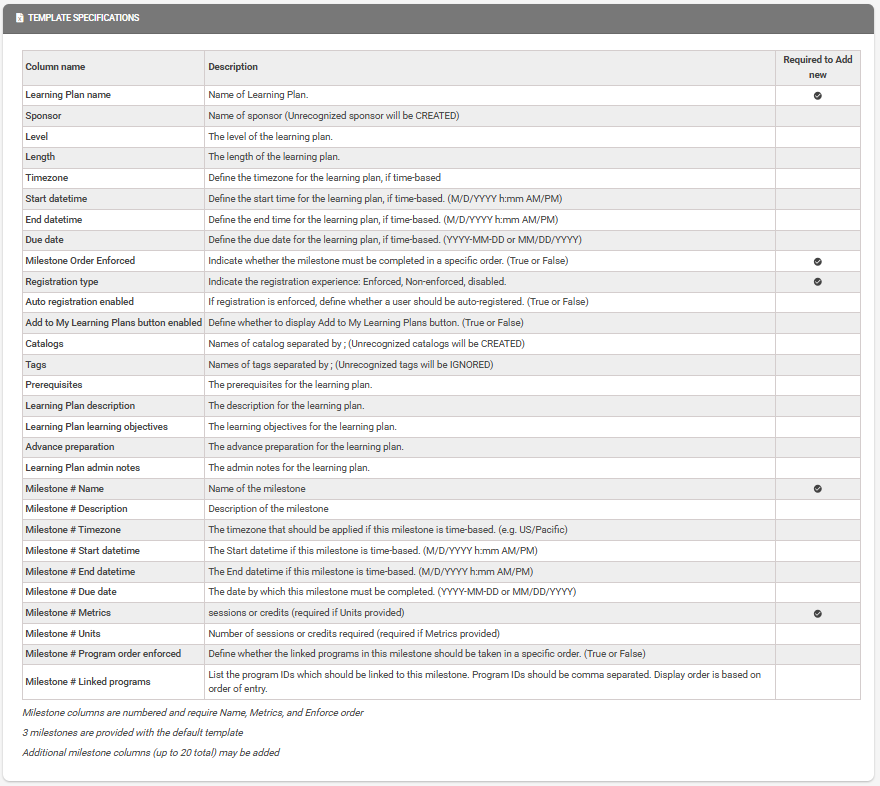
Once you have elected to add Learning Plans using this Bulk Upload type, you will have access to download the Learning Plans Template. Once the Learning Plan option has been chosen, you will have exposure to complete the template and begin the process of adding learning plans in bulk.
The Template Specifications table, visible on the second half of this page, is also important to review. This table confirms the data available to add in bulk, the column descriptions, and whether the columns are required.
Populating the Template
The Excel will be formatted to account for a learning plan per row, along with columns representing all fields that could be populated for a learning plan through this process.
As you populate this template, take note of the following tabs embedded within the Excel file:
- Timezone choices
- Level choices
- Registration type choices

Available Actions
For Learning Plans, administrators will only have the option to Add New Learning plans in bulk. The ability to update learning plans in bulk is currently not supported.
Processing Request
If the file was loaded successfully, and the required columns were identified, you will be able to proceed with the next step to Validate Data and Preview.
For more information on reviewing, data, and submitting your request, please reference the Bulk Upload Request article and the section on Previewing Data.
Related to